前言

git属于分布式版本管理系统,是为版本管理而设计的软件

Git结构

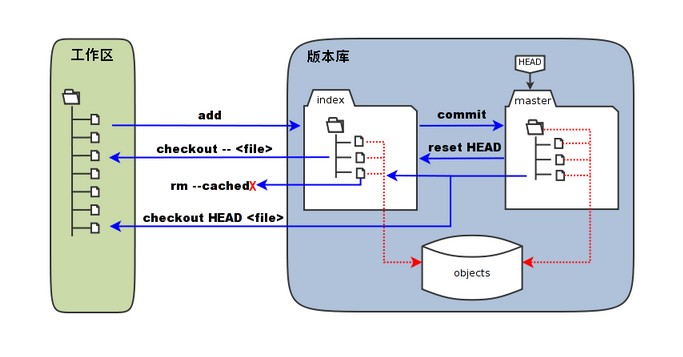
你的本地仓库有 Git 维护的三棵“树”组成,这是 Git 的核心框架。这三棵树分别是:工作区域、暂存区域和 Git 仓库

版本库:工作区有一个隐藏目录 .git,这个是 Git 的版本库。(从github down 下来的代码都有该文件夹)
暂存区:英文叫 stage 或 index。一般存放在 .git 目录下的 index 文件(.git/index)中,事实上它只是一个文件,保存即将提交的文件列表信息。

当你使用git init时,会创建 .git 目录

1
2
3
4
5
6
7
8
9
10
11
12
13
14
15
16
17
18
19
20
21
22
23
24
25
26
27
28
29
30
31
32
33
34
35
36
37
38
39
40
41
42
43
.git
├── branches
├── config //仓库配置文件,对应git config
├── COMMIT_EDITMSG //保存当前 commit 时的消息内容
├── description //存储库的简短描述
├── HEAD //指向当前分支的最新提交记录,用于表示当前工作区的状态。
├── hooks //某些操作前后会触发脚本
│ ├── applypatch-msg.sample
│ ├── commit-msg.sample
│ ├── fsmonitor-watchman.sample
│ ├── post-update.sample
│ ├── pre-applypatch.sample
│ ├── pre-commit.sample
│ ├── pre-merge-commit.sample
│ ├── pre-push.sample
│ ├── pre-rebase.sample
│ ├── pre-receive.sample
│ ├── prepare-commit-msg.sample
│ └── update.sample
├── index
├── info
│ └── exclude
├── logs //保存所有更新的引用记录
│ ├── HEAD
│ └── refs
│ ├── heads
│ │ └── master
│ └── remotes
│ └── origin
│ └── HEAD
├── objects //存储压缩的commit object,git show把提交对象里的内容解压出来,并展示
│ ├── info
│ └── pack
│ ├── pack-642055eca2f2e9363267c11ebb5f683ba2bcb6bc.idx
│ └── pack-642055eca2f2e9363267c11ebb5f683ba2bcb6bc.pack
├── packed-refs
└── refs
├── heads //对应git branch
│ └── master
├── remotes
│ └── origin
│ └── HEAD
└── tags //对应git tag

git config

git config的数据来源来自三个配置文件

  1. 本地(Local) .git/config 仅当前仓库 –local(默认)
  2. 全局(Global) ~/.gitconfig 当前用户所有仓库 –global
  3. 系统(System) /etc/gitconfig 系统所有用户 –system
    1
    2
    3
    4
    5
    6
    7
    8
    9
    10
    11
    12
    13
    14
    15
    16
    17
    18
    19
    20
    21
    #配置
    #例:用户信息配置,要在某个特定的项目中使用其他名字或者电邮,只要去掉 --global 选项重新配置即可
    git config --global user.name "runoob"
    git config --global user.email test@runoob.com


    #查看配置信息
    git config --list
    #使用astextplain作为文本转换器
    diff.astextplain.textconv=astextplain
    #Git在HTTPS请求中使用的SSL后端和证书文件。
    http.sslbackend=openssl
    http.sslcainfo=D:/博客/Git/mingw64/ssl/certs/ca-bundle.crt
    #配置Git使用的默认代码编辑器,--wait参数告诉编辑器在关闭之前不要退出终端进程
    core.editor="C:\Users\DELL\AppData\Local\Programs\Microsoft VS Code\Code.exe" --wait
    #与Git相关的用户名和电子邮件地址。
    user.email=****@qq.com
    user.name=mayylu
    #以使用本地存储方式保存用户凭据。
    credential.helper=store
    git config user.name #查单个值

git实战

项目状态分为: 已修改(modified)、已暂存(staged)和已提交(committed)

例:
在.git同级目录(即工作区)新建1.txt,2.txt和12目录,现使用git add 1.txt 上传暂存区,

1
2
3
4
5
6
7
8
9
10
11
12
13
git status #查看本地库状态 
On branch master

No commits yet

Changes to be committed:
(use "git rm --cached <file>..." to unstage)
new file: 1.txt

Untracked files:
(use "git add <file>..." to include in what will be committed)
12/
2.txt

git创建仓库

1
2
git init    #初始化本地库    
git clone #拷贝一份远程仓库

git 工作区和版本库的交互

1352126739_7909

1

1
2
3
4
5
6
7
8
9
10
11
12
13
14
#工作区->暂存区
git add 文件名 #提交到暂存区
git checkout -- 文件名 #暂存区回退到工作区
git rm --cached 文件名 #删除暂存区某文件
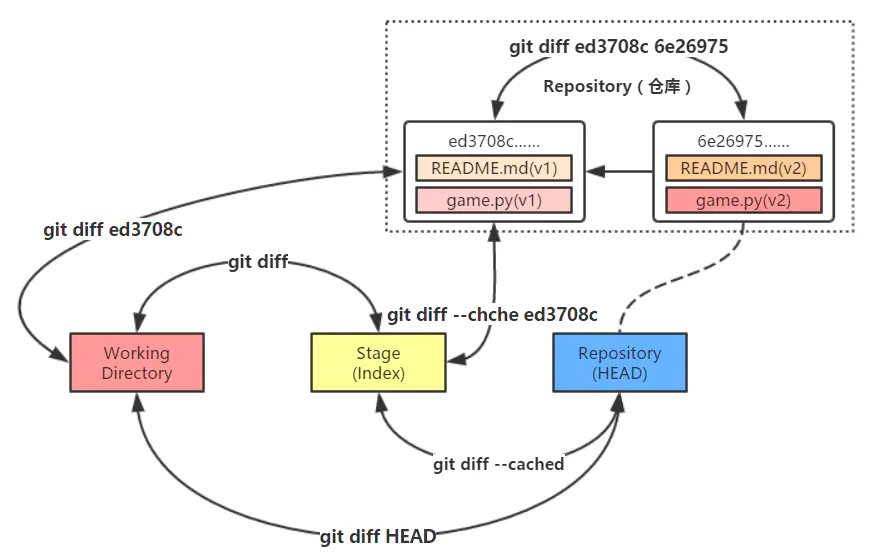
git diff #比较暂存区域与工作目录的文件内容

# 暂存区->本地库分支
git commit -m"fix: 修复bug" #将暂存区的内容提交到本地库分支,并写消息做记录
git reset HEAD #分支回退到暂存区
git diff --cached #比较当前分支快照与当前暂存区内容

# 本地库分支->工作区
git checkout HEAD <file> #会用 HEAD 指向的 master 分支中的全部或者部分文件替换暂存区和以及工作区中的文件
git diff HEAD #比较当前分支快照与当前工作目录内容

回溯

1
2
3
4
5
6
7
8
9
10
11
12
13
14
15
16
git log       #查看commit历史记录
commit 7aee593858faa4d22749ff4a349bc4a12c2e529d (HEAD -> master, a)
Author: mayylu <2059973019@qq.com>
Date: Thu Apr 13 15:07:24 2023 +0800

test
git reflog #查看操作历史记录
7aee593 (HEAD -> master, a) HEAD@{0}: checkout: moving from a to master
7aee593 (HEAD -> master, a) HEAD@{1}: checkout: moving from master to a
7aee593 (HEAD -> master, a) HEAD@{2}: commit (initial): test


git show 对应的哈希值 #用于显示 Git 中某次提交或某个对象的详细信息
git reset --hard 对应的哈希值 # 在日志中找出回溯历史之前的哈希值,通过git reset --hard命令恢复到回溯历史前的状态

git checkout -- 文件名 #暂存区回退到工作区

git 分支

master分支(Git 2.28 版本后,Git 将默认分支名称更改为“main”)是Git默认创建的分支,因此基本上所有开发都是以这个分支为中心进行的。
分支可以管理版本,也可以进行多个功能的开发

1
2
3
git branch              #查看分支  
a
* master #当前分支

在 Git 中,分支信息保存在特殊的 Git 对象中,这些对象存储在您的本地 .git 目录中。每个分支都有一个指针(或引用),指向最新提交的 SHA-1 校验和。该指针通常保存在 .git/refs/heads/ 目录下与分支名称对应的文件中。

1
2
3
4
5
git branch 分支名       #创建分支(创建时自动克隆当前分支)  
git branch -d 分支名 #删除分支
git checkout 分支名 #切换分支
git checkout -b 分支名 #创建、切换分支
git merge 分支名 #将一个分支中发生的更改合并到当前所在的分支中

只要创建多个分支,就可以在不互相影响的情况下同时进行多个功能的开发

git 远程库

远程仓库顾名思义,是与我们本地仓库相对独立的另一个仓库,让我们可以在GitHub上创建一个仓库,并将其设置为本地仓库的远程仓库,本地 Git 仓库和 GitHub 仓库之间的传输是通过SSH加密的,需要提前绑定ssh密钥

1
2
3
4
5
6
7
8
9
10
11
git clone 远程地址               #把远程仓库clone到本地,当您克隆一个包含代码的远程仓库时,Git 会自动将该远程仓库命名为 origin
git clone -b 分支名 仓库地址 #克隆的远程仓库的特定分支,并将你的工作目录设置为该分支
git remote add [别名] [url] #关联远程仓库,分配给远程仓库的别名
git remote -v #查看所有关联远程仓库别名
git remote rm [别名] #取消别名关联

git fetch 远程仓库别名 远程分支名 #会获取远程仓库中有的新提交,但并不会修改本地的工作目录或当前分支。

git push 远程仓库别名 远程分支名 #推送本地分支到远程仓库
git pull 远程仓库别名 远程分支名 #推送远程仓库到本地分支
#git pull命令实际上包含了两个步骤:首先执行git fetch,然后自动调用git merge将远程分支的更新合并到当前分支上